
This documents the Delete Story flow — a synchronous pipeline that deletes screenshots from MinIO S3, then removes the AdventureTubeData from MongoDB, all tracked via SSE.
Design / Architecture
Why not a separate Kafka topic for screenshot deletion? Unlike screenshot generation (15-20s with yt-dlp + ffmpeg), screenshot deletion is just S3 DELETE API calls — ~100-200ms total for 5 chapters. Fast enough to run synchronously within the SSE timeout (30s). One Kafka message, one consumer, one trackingId.
| Decision | Rationale |
|---|---|
| Synchronous in StoryConsumer | S3 delete is fast (~200ms), no need for separate Kafka topic |
| SSE for delete | iOS needs confirmation that delete completed for UI update |
| No ScreenshotJobStatus | ScreenshotJobStatus is only for screenshot generation, not deletion |
| Ownership check in consumer | Validates ownerEmail before any deletion occurs |
| Single trackingId | Same correlation ID flows from Controller → Kafka → StoryConsumer → SSE |
Comparison: Create vs Delete
| Create Story | Delete Story | |
|---|---|---|
| SSE | Yes (database save) | Yes (full delete) |
| Screenshot handling | Async via separate Kafka topic (~15-20s) | Synchronous in StoryConsumer (~200ms) |
| ScreenshotJobStatus | Created for iOS polling | Not used |
| Kafka topics | adventuretube-data + adventuretube-screenshots | adventuretube-data only |
| Duration | ~300ms (SSE) + ~15-20s (screenshots async) | ~200-300ms total |
Sequence Diagram
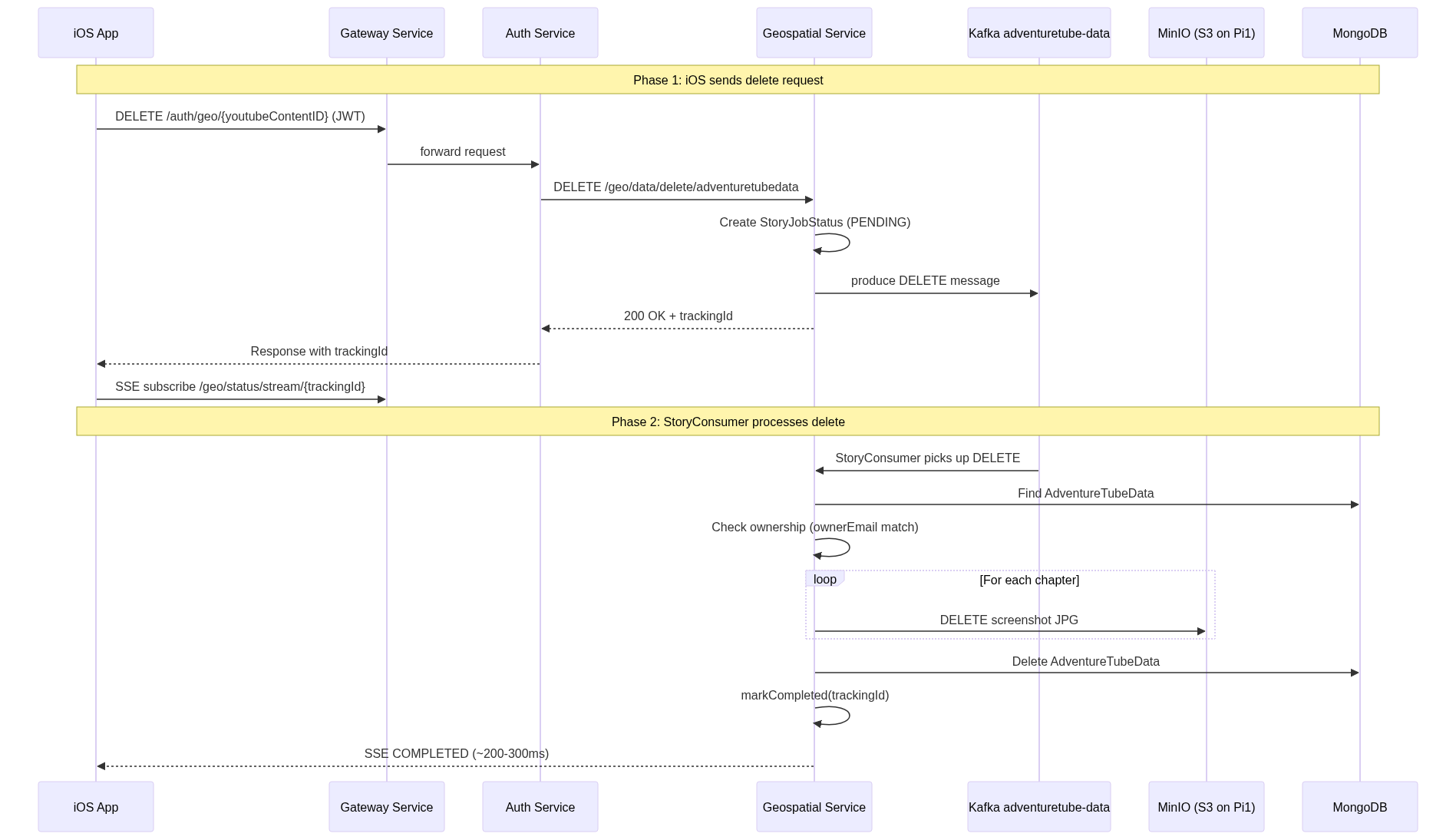
iOS Call Stack: Delete Flow
deletePublishedStory()                             // AddStoryViewVM+Publishing.swift
│
├─ cancelSSEStream()                                // kill any old SSE
│
├─ deleteStory(youtubeContentId:)                   // REST: DELETE /auth/geo/{id}
│  ├─ withTokenRefresh { accessToken in }            // auto 401 retry
│  │  └─ session.dataTaskPublisher(for: request)
│  │     └─ .tryMap → guard 200-299 → decode JSON
│  │
│  └─ .sink
│     ├─ receiveCompletion: { error → .failed }
│     │
│     └─ receiveValue: { response → got trackingId }
│        └─ startSSETracking(trackingId:, onCompleted:)
│           ├─ publishingStatus = .streaming
│           ├─ streamJobStatus(trackingId:)
│           │  └─ SSEClient → URLSession → dataTask
│           │
│           └─ .sink receiveValue: { jobStatus →
│                 handleJobStatus(jobStatus, onCompleted:)
│                 ├─ .COMPLETED → cancelSSEStream()
│                 │              → isPublished = false
│                 │              → isStoryPublished = false
│                 │              → publishingStatus = .deleted → UI
│                 ├─ .PENDING    → keep waiting
│                 ├─ .FAILED     → .failed(message:)
│                 └─ .DUPLICATED → .failed(message:)
│              }
Java Call Stack: Delete Flow
AdventureTubeDataController.deleteByYoutubeContentID()
│                                                    // DELETE /geo/data/delete/adventuretubedata
├─ trackingId = UUID.randomUUID().toString()
├─ jobStatusService.createPendingJob(trackingId)
├─ producer.deleteAdventureTubeData(trackingId, id, email)
│  └─ kafkaTemplate.send("adventuretube-data", json)
└─ return 200 OK + ServiceResponse(pendingJob)

--- Kafka consumer thread (async) ---

StoryConsumer.consume(message)
│  └─ switch(DELETE) → handleDelete(kafkaMessage, trackingId)

StoryConsumer.handleDelete()
│
├─ adventureTubeDataService.findByYoutubeContentID()
│  └─ Optional<AdventureTubeData>
│
├─ .map(data -> {
│     if (!data.getOwnerEmail().equals(ownerEmail))
│        throw OwnershipMismatchException
│     return data;
│  })
│  .orElseThrow(() -> DataNotFoundException)
│
├─ screenshotService.deleteScreenshots(id, data)
│  └─ data.getChapters().forEach(chapter -> {
│        s3Client.deleteObject(bucket, chapter.getScreenshotUrl())
│     })
│
├─ adventureTubeDataService.deleteByYoutubeContentIdAndOwnerEmail()
│
└─ jobStatusService.markCompleted(trackingId)
   └─ SseEmitterManager sends COMPLETED event

--- catch block ---
catch (Exception e)
└─ jobStatusService.markFailed(trackingId, e.getMessage())
Flow Details
Order Matters
1. Find data in MongoDB (need screenshotUrl from chapters)
2. Delete S3 objects (using screenshotUrl keys)
3. Delete AdventureTubeData from MongoDB (data no longer needed)
If MongoDB data is deleted first, the screenshotUrl references are lost and S3 objects become orphaned.
Performance
| Operation | Duration | Blocks iOS? |
|---|---|---|
| Ownership check | ~5ms | No (within SSE) |
| S3 delete (5 chapters) | ~100-200ms | No (within SSE) |
| MongoDB delete | ~5ms | No (within SSE) |
| Total | ~200-300ms | SSE COMPLETED |
Error Handling
| Error | Behavior |
|---|---|
| Data not found | DataNotFoundException → markFailed → SSE FAILED |
| Ownership mismatch | OwnershipMismatchException → markFailed → SSE FAILED |
| S3 delete failure | Exception → markFailed → SSE FAILED |
iOS: Handle 404 on Delete (TODO)
When the backend returns FAILED via SSE because the story doesn’t exist in MongoDB (already deleted), iOS currently shows “Job failed” and never cleans up local state. The fix:
// In deletePublishedStory() receiveCompletion:
if case .failure(let error) = completion {
    if let backendError = error as? BackendError,
       case .notFound = backendError {
        // Story doesn't exist on server — clean up locally
        self?.markStoryAsDeletedLocally()
    } else {
        self?.publishingStatus = .failed(message: error.localizedDescription)
    }
}