
This documents the Chapter Screenshot Service — an async pipeline that extracts screenshots from YouTube videos at each chapter timestamp and uploads them to MinIO (S3-compatible storage).
Design / Architecture
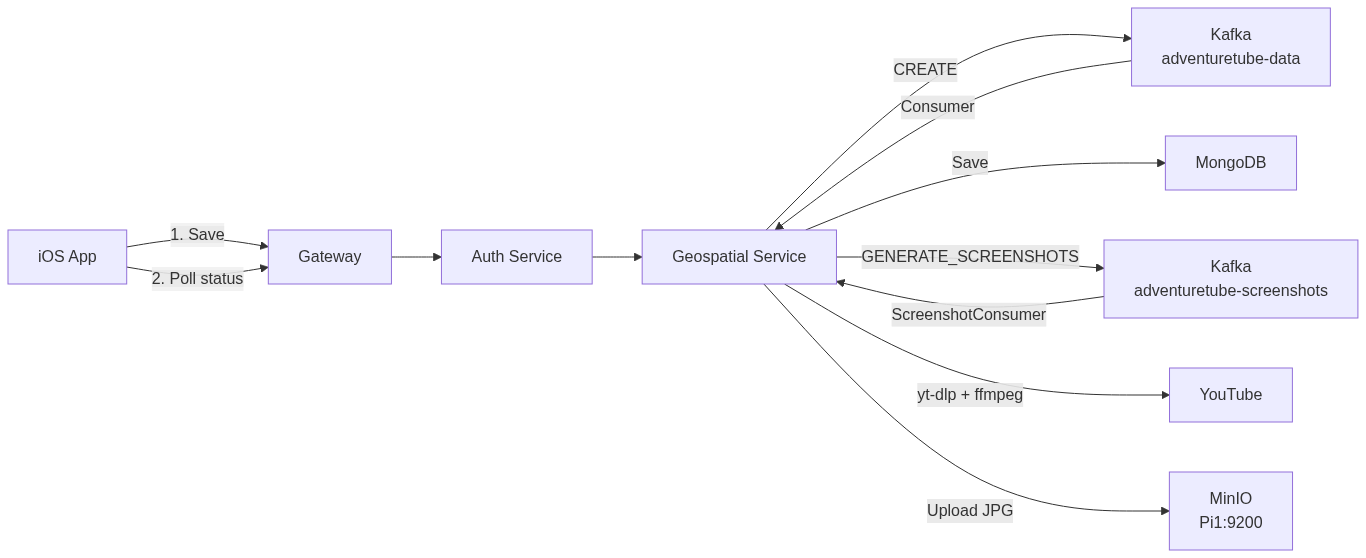
Why a separate topic? Screenshot extraction takes 15-20s per video (yt-dlp + ffmpeg + MinIO upload). If added to the existing adventuretube-data consumer, it would block the SSE response to iOS and risk the 30s SseEmitter timeout. A separate topic keeps the save flow fast (~300ms) and processes screenshots independently.
| Topic | Action | Consumer | Duration | Blocks SSE? |
|---|---|---|---|---|
adventuretube-data |
CREATE / DELETE | StoryConsumer.java | ~200ms | No (SSE responds immediately) |
adventuretube-screenshots |
GENERATE_SCREENSHOTS | ScreenshotConsumer.java | ~15-20s | No (separate consumer) |
Sequence Diagram: Phase 1 — Save (existing flow)
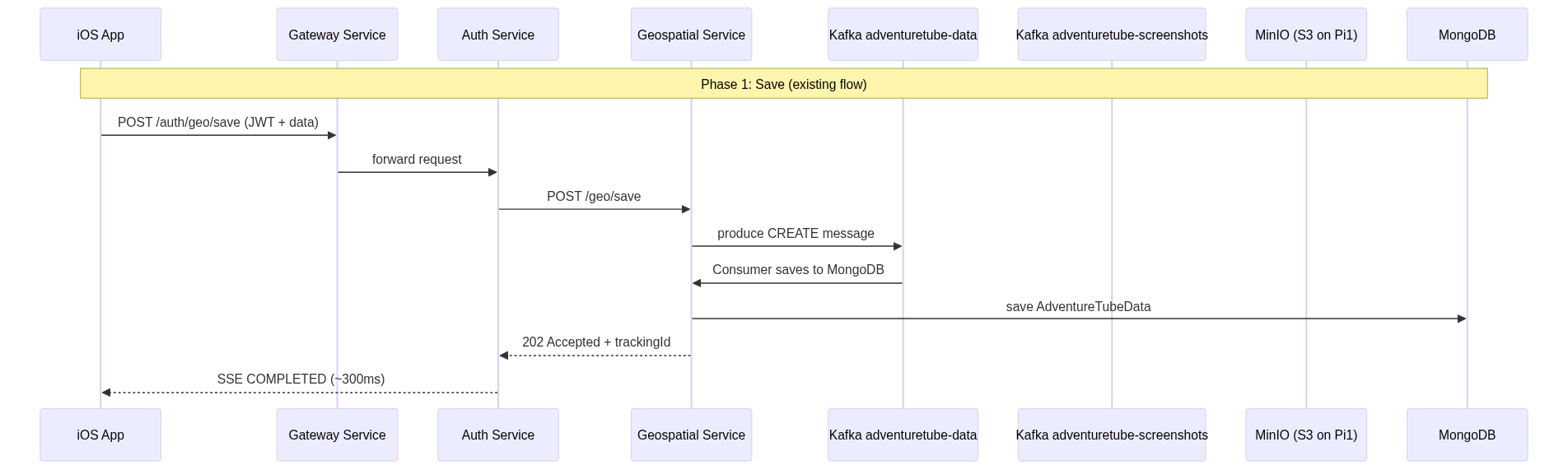
Phase 1 (Save) is simplified here. For the full sequence diagram with token refresh, SSE streaming, and Zipkin traces, see Episode 1: Publish Story.
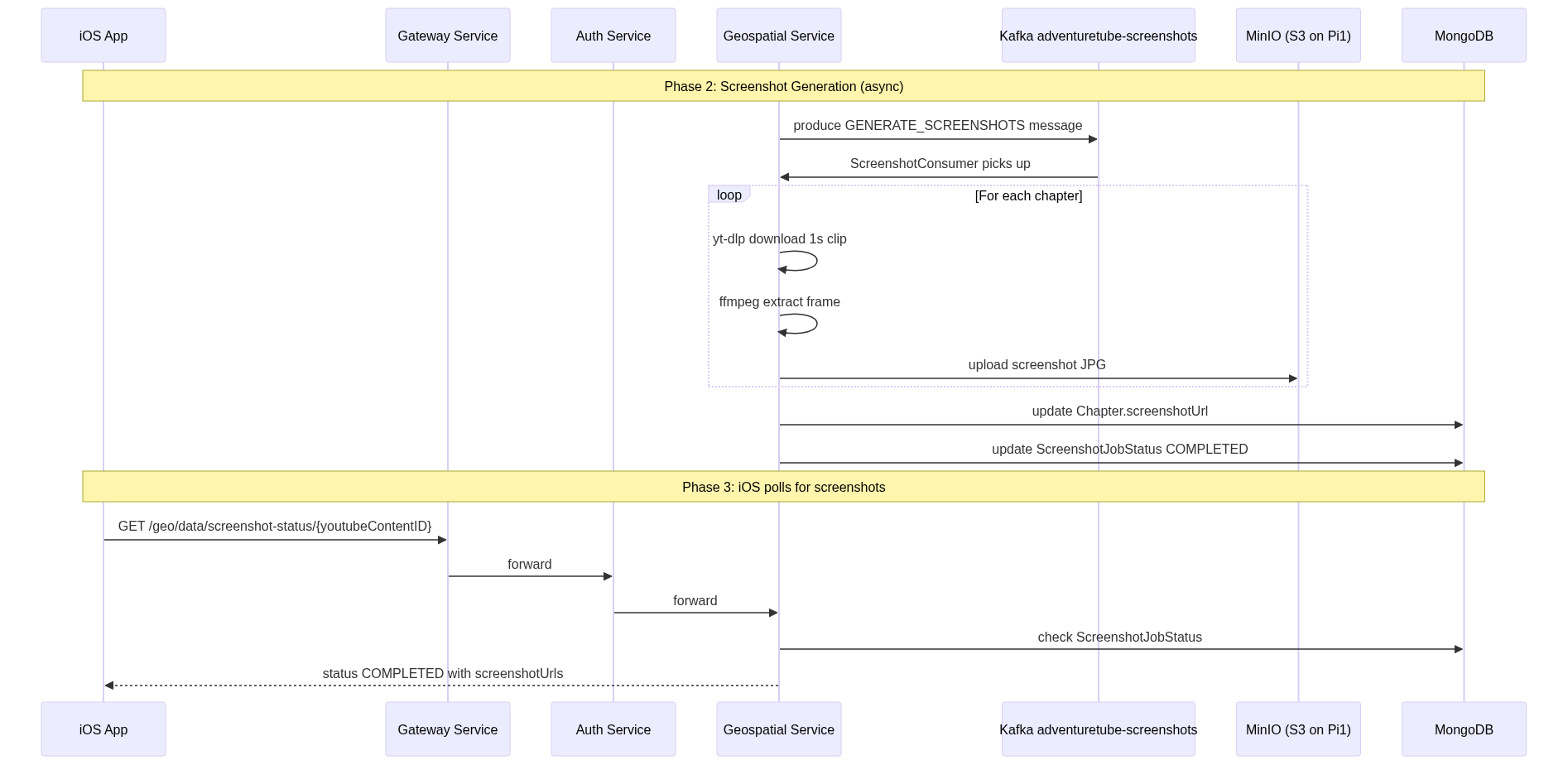
Sequence Diagram: Phase 2 & 3 — Screenshot Generation + iOS Polling
iOS Call Stack: Screenshot Flow
Phase 1 (save) reuses the existing publish flow. Phase 3 (polling) is new — not yet implemented.
uploadStory()                                      // AddStoryViewVM+Publishing.swift
│
│  Phase 1: Save (existing publish flow)
├─ publishStory(jsonData:)                          // POST /auth/geo/save
│  └─ .sink receiveValue: { response → trackingId }
│     └─ startSSETracking(trackingId:, onCompleted:)
│        └─ handleJobStatus → .COMPLETED
│           └─ onCompleted(jobStatus)
│              ├─ isPublished = true
│              ├─ publishingStatus = .completed → UI
│              │
│              │  Phase 3: Screenshot Polling (TODO)
│              └─ startScreenshotPolling(youtubeContentID:)
│                 ├─ Timer.publish(every: 5.0)
│                 │  └─ pollScreenshotStatus(youtubeContentID:)
│                 │     └─ GET /auth/geo/data/screenshot-status/{id}
│                 │
│                 └─ .sink receiveValue:
│                    ├─ .COMPLETED → applyScreenshotUrls()
│                    ├─ .FAILED    → screenshotStatus = .failed
│                    └─ .PROCESSING → keep polling
Java Call Stack: Screenshot Generation Flow
Triggered automatically after story save — no separate iOS request.
ScreenshotConsumer.consume(message)
│  └─ switch(GENERATE_SCREENSHOTS) → handleGenerateScreenshots()
│
ScreenshotService.processScreenshotJob()
│
├─ screenshotJobStatusRepository.findByYoutubeContentID()
│  ├─ .map(existing → update to PENDING, save)
│  └─ .orElseGet(() → create new, save)
│
├─ tempDir = Files.createTempDirectory("screenshot")
│
├─ for each chapter:
│  ├─ yt-dlp download 1s clip at chapter.youtubeTime
│  ├─ ffmpeg extract frame → JPG
│  ├─ s3Client.putObject(bucket, key, file)          // upload to MinIO
│  ├─ chapter.setScreenshotUrl(s3Key)
│  └─ screenshotJobStatusRepository.save(progress)
│
├─ adventureTubeDataRepository.save(data)             // update MongoDB
│
└─ jobStatus.setStatus(COMPLETED)
   └─ screenshotJobStatusRepository.save(jobStatus)
Flow Details
Phase 1: Save (unchanged)
The existing save flow is not modified. iOS gets SSE COMPLETED in ~300ms as before. The only change in StoryConsumer.handleSave() is one new line after markCompleted():
// After save + markCompleted (SSE already sent to iOS)
producer.sendScreenshotRequest(saved.getYoutubeContentID(), saved);
Phase 2: Screenshot Generation (new)
ScreenshotConsumer listens on adventuretube-screenshots topic:
- Creates
ScreenshotJobStatus(PROCESSING) in MongoDB - For each chapter: yt-dlp downloads a 1s clip → ffmpeg extracts frame → S3 uploads to MinIO
- Updates each Chapter document in MongoDB with
screenshotUrl - Marks ScreenshotJobStatus as COMPLETED
Phase 3: iOS Polls (new endpoint)
iOS polls GET /geo/data/screenshot-status/{youtubeContentID} every 5 seconds:
| Response | Meaning | iOS Action |
|---|---|---|
{ "status": "PROCESSING" } |
Screenshots still generating | Keep polling |
{ "status": "COMPLETED" } |
All screenshots ready | Fetch updated data, stop polling |
{ "status": "FAILED" } |
Screenshot generation failed | Show placeholder, stop polling |
404 |
No screenshot job exists | Show placeholder |
Data Models
KafkaAction (updated)
public enum KafkaAction {
    CREATE,
    UPDATE,
    DELETE,
    GENERATE_SCREENSHOTS  // NEW
}
ScreenshotJobStatus (new MongoDB document)
@Document(collection = "screenshotJobStatus")
public class ScreenshotJobStatus {
    @Id private String id;
    @Indexed(unique = true) private String youtubeContentID;
    private ScreenshotStatus status;  // PENDING, PROCESSING, COMPLETED, FAILED
    private int totalChapters;
    private int completedChapters;
    private String errorMessage;
    private LocalDateTime createdAt;
    private LocalDateTime updatedAt;
    @Indexed(expireAfter = "7d") private LocalDateTime expireAt;
}
Chapter (updated)
public class Chapter {
    // existing fields...
    private String screenshotUrl;  // NEW — MinIO S3 key
}
New Components
| Component | Type | Purpose |
|---|---|---|
ScreenshotConsumer |
Kafka Consumer | Listens on adventuretube-screenshots, triggers extraction |
ScreenshotService |
Service | Core logic: yt-dlp + ffmpeg + S3 upload + MongoDB update |
ScreenshotJobStatus |
Entity | Tracks screenshot generation progress per video |
MinioConfig |
Config | S3Client bean configured for MinIO |
GET /geo/data/screenshot-status/{id} |
REST Endpoint | iOS polls this for screenshot readiness |
MinIO Storage (S3 on Pi1)
| Property | Value |
|---|---|
| Bucket | chapter-screenshots |
| S3 Key Format | {youtubeContentID}/ch{index}_{youtubeTime}s.jpg |
| Public URL | https://s3.travel-tube.com/chapter-screenshots/{key} |
Example files in MinIO:
chapter-screenshots/
  WsghFCuoZ6Q/
    ch1_176s.jpg     (49KB)
    ch2_431s.jpg     (67KB)
    ch3_756s.jpg     (50KB)
    ch4_989s.jpg     (20KB)
    ch5_1152s.jpg    (26KB)
Performance Impact
Zero impact on save flow. The existing save → SSE response remains ~300ms. Screenshot generation runs asynchronously on a separate Kafka consumer thread.
| Operation | Duration | Blocks iOS? |
|---|---|---|
| Save to MongoDB + SSE | ~300ms | No (returns immediately) |
| Screenshot generation (5 chapters) | ~15-20s | No (async via separate Kafka topic) |
| iOS polling (per request) | ~50ms | No (lightweight REST) |
Dependencies
| Dependency | Purpose |
|---|---|
software.amazon.awssdk:s3 |
S3 client for MinIO uploads |
yt-dlp (CLI) |
YouTube video clip download |
ffmpeg (CLI) |
Frame extraction from video clip |
Note: yt-dlp and ffmpeg must be installed on the host machine / Docker image running geospatial-service.