
This page is the master technical reference for the AdventureTube backend platform — a Spring Cloud microservices system deployed on a 3-node Raspberry Pi cluster.
Tech Spec
| Category | Technology |
|---|---|
| Language | Java 21 (Virtual Threads) |
| Framework | Spring Boot 3.4.0, Spring Cloud 2024.0.0 |
| Reactive Stack | Spring WebFlux (Netty) — Auth Service |
| Blocking Stack | Spring MVC (Tomcat) — Member, Geospatial, Web Services |
| API Gateway | Spring Cloud Gateway (Netty/Reactive) |
| Service Discovery | Netflix Eureka |
| Configuration | Spring Cloud Config (Git-backed) |
| Inter-Service HTTP | WebClient (Reactive) via shared ServiceClient |
| Circuit Breaker | Resilience4j 2.2.0 |
| Authentication | JWT + Google OAuth2 |
| Relational DB | PostgreSQL 17 (JPA/Hibernate) |
| Document DB | MongoDB 4.4 (Spring Data MongoDB) |
| Event Streaming | Apache Kafka (KRaft mode, 2-broker cluster) |
| Event Streaming Topics | 4 topics: adventuretube-data-create, adventuretube-data-delete, adventuretube-screenshots-create, adventuretube-screenshots-delete |
| Object Storage | MinIO S3-compatible (chapter screenshots) |
| Async Notification | SSE (Server-Sent Events) via SseEmitter |
| Distributed Tracing | Micrometer + Brave + Zipkin |
| Monitoring | Grafana + Prometheus + cAdvisor |
| CI/CD | Jenkins (Master/Agent) + GitHub Webhooks |
| Containerization | Docker Compose |
| Infrastructure | 3-node Raspberry Pi cluster (ARM64) |
| Reverse Proxy | Nginx Proxy Manager + Let’s Encrypt SSL |
| API Documentation | Swagger/OpenAPI 3.1 via SpringDoc |
1. Spring Microservice Architecture
Architecture Overview
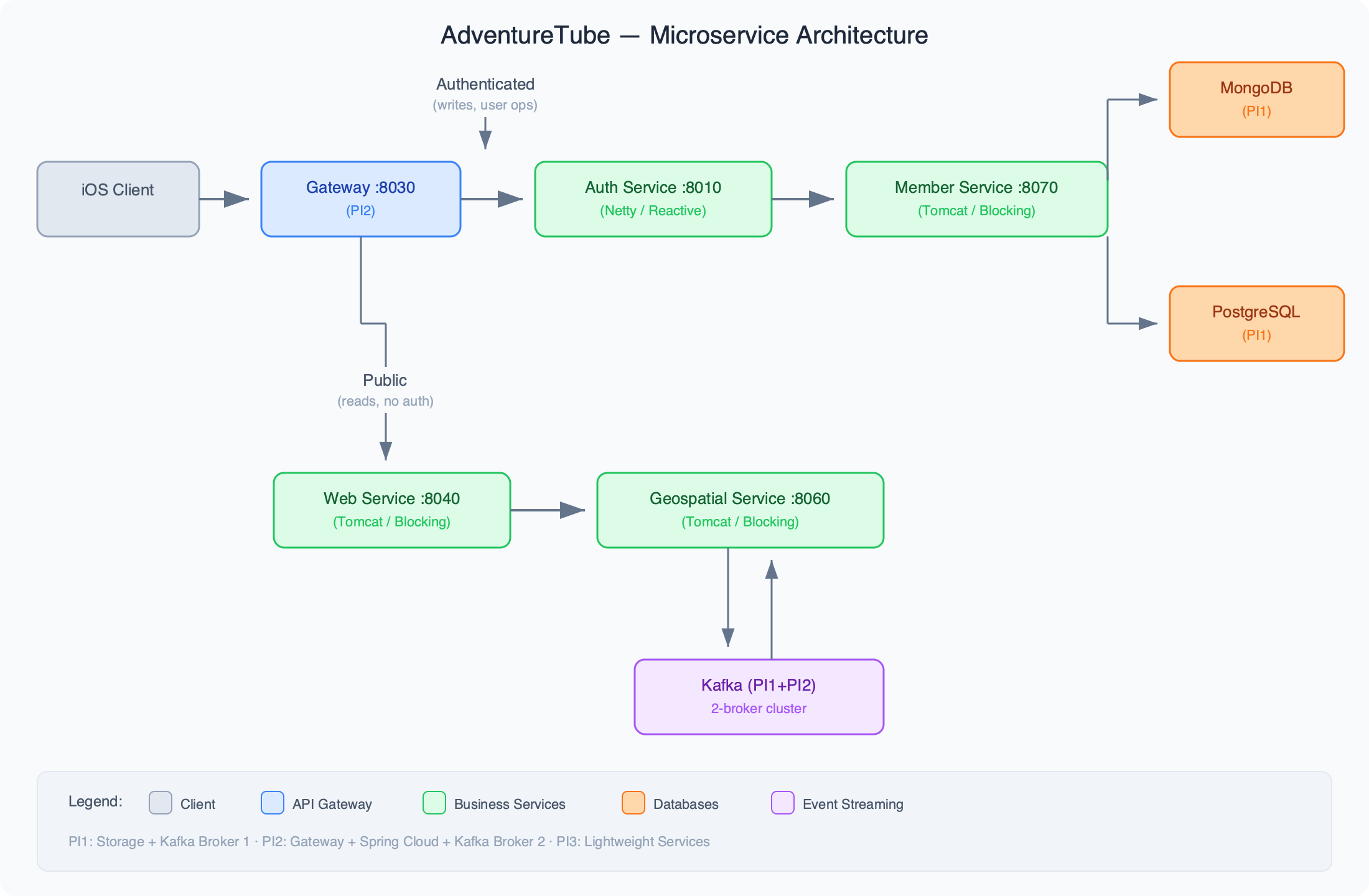
Service Registry & Discovery
- Eureka Server (PI2:8761) — all services register here
- Config Service (PI2:9297) — centralized config backed by Git repo
- Gateway Service (PI2:8030) — single entry point, routes to all business services
Swagger Open API
Business Services
Currently deployed via Jenkins to PI2. In dev mode, run locally on Mac and register to Eureka on PI2.
| Service | Port | Stack | Database |
|---|---|---|---|
| Auth Service | 8010 | WebFlux (Netty) | None — calls member-service |
| Member Service | 8070 | MVC (Tomcat) | PostgreSQL (PI1) |
| Geospatial Service | 8060 | MVC (Tomcat) | MongoDB (PI1) |
| Web Service | 8040 | MVC (Tomcat) | None — calls geospatial-service |
Data Layer
| Store | Host | Port | Used By |
|---|---|---|---|
| PostgreSQL | PI1 | 5432 | Member Service (JPA/JDBC) |
| MongoDB | PI1 | 27017 | Geospatial Service |
| Kafka (2-broker cluster) | PI1 + PI2 | 29092 | Event streaming (geospatial-service producer/consumer) |
| MinIO (S3) | PI1 | 9200 | Chapter screenshot storage (geospatial-service) |
Kafka Cluster (KRaft Mode — No Zookeeper)
| Broker | Host | Role | Ports |
|---|---|---|---|
| kafka1 | PI1 (192.168.1.199) | broker + controller | 9092, 29092, 19092, 9093 |
| kafka2 | PI2 (192.168.1.105) | broker only | 9092, 29092, 19092 |
- Cluster ID:
HLThU0HXQJegC_vT4NGpCw - Topics:
adventuretube-data-create(2 partitions),adventuretube-data-delete(1 partition),adventuretube-screenshots-create(1 partition),adventuretube-screenshots-delete(1 partition) - Kafdrop UI: PI1:9000 (kafka.travel-tube.com)
2. Docker Architecture — Three-Layer Separation of Concerns
With this tech stack, the entire backend system is organized into three distinct layers, which makes perfect sense for creating separate Docker Compose files for initialization and management. The first two sections — Infrastructure Layer and Platform Layer — are not subject to frequent development iteration, but rather serve as a stable foundation. The Business Layer is where development and iteration of business logic is focused, except in situations where there are major updates for infrastructure or platform levels.
Infrastructure Layer (Storage Systems)
File: docker-compose-storages.yml
This foundational layer provides all data persistence and storage systems:
- PostgreSQL Database: Primary relational database for structured data, user profiles, and content metadata
- MongoDB Database: NoSQL database optimized for geospatial data and flexible content storage
- Redis Cache: In-memory caching for session management and performance optimization
- Storage Volumes: Persistent file storage for media content and system backups
Platform Layer (Spring Cloud Applications)
File: docker-compose-clouds.yml
This layer handles cross-cutting concerns and system-wide functionality:
Eureka Server
Central service registry that handles automatic registration, health monitoring, and dynamic service discovery for all microservices.
Config Server
Centralized configuration management system that provides environment-specific settings and Git-based version control for all services.
Gateway Service
Single entry point API gateway that handles request routing, authentication, rate limiting, and Swagger documentation aggregation.
Business Layer (Domain Services)
File: docker-compose-adventuretubes.yml
This layer focuses on specific business capabilities and domain logic:
Auth Service
JWT-based authentication and authorization service with Google OAuth integration for secure user identity management.
Member Service
User profile and account management service handling registration, preferences, and relationship data.
Geospatial Service
Location-based service using MongoDB for spatial data, Kafka for fail-safe storage processing, and MinIO S3 for chapter screenshot storage. Includes async screenshot generation pipeline (yt-dlp + ffmpeg + MinIO upload) triggered via Kafka events.
Web Service
Frontend interface service that provides APIs for any web application needing integration with the AdventureTube content ecosystem.
Architectural Benefits
This structure allows for independent scaling, deployment, and technology choices while maintaining clear boundaries between infrastructure, platform, and business concerns. This approach provides great flexibility in managing the entire system, allowing the use of two separate Raspberry Pi 5 micro servers without paying for cloud services during the development phase.
3. CI/CD Pipeline & Environment Variables
→ See dedicated post: AdventureTube Cloud Services – CI/CD Pipeline & Environment Variables
4. Pi Cluster — All Services
PI1 — 192.168.1.199 (Storage + Monitoring + Tooling)
| Container | Stack | Purpose |
|---|---|---|
| kafka1 | adventuretube-microservice | Kafka broker + KRaft controller |
| kafdrop | adventuretube-microservice | Kafka web UI |
| postgres | adventuretube-microservice | PostgreSQL (member-service) |
| pgadmin | adventuretube-microservice | PostgreSQL admin UI |
| mongodb | adventuretube-microservice | MongoDB (geospatial-service) |
| mongo-express | adventuretube-microservice | MongoDB admin UI |
| minio | adventuretube-microservice | MinIO S3 object storage (chapter screenshots) |
| jenkins-master | jenkins-docker-compose | CI/CD server |
| grafana | grafana-prometheus-docker-compose | Dashboards |
| prometheus | grafana-prometheus-docker-compose | Metrics collection |
| zipkin | grafana-prometheus-docker-compose | Distributed tracing |
| cadvisor | grafana-prometheus-docker-compose | Container metrics |
| node_exporter | grafana-prometheus-docker-compose | Host metrics |
| kafka-exporter | grafana-prometheus-docker-compose | Kafka metrics |
| nginx-app-1 | nginx | Reverse proxy for all domains |
| nginx-db-1 | nginx | Nginx Proxy Manager DB |
| n8n | n8n-docker-compose | Workflow automation |
| wordpress | wordpress | Blog |
| wordpress-db | wordpress | WordPress DB |
| fastapi_whisper | whisper | Whisper AI transcription |
| portainer | – | Docker management UI |
PI2 — 192.168.1.105 (Spring Cloud + Kafka Broker 2)
| Container | Stack | Purpose |
|---|---|---|
| config-service | adventuretube-microservice | Centralized config (Git-backed) |
| eureka-server | adventuretube-microservice | Service discovery |
| gateway-service | adventuretube-microservice | API Gateway |
| kafka2 | adventuretube-microservice | Kafka broker (2nd node) |
| adventurevictoria | adventuretube | AdventureVictoria web app |
| jenkins-agent | jenkins-docker-compose | CI/CD build agent |
| kafka-exporter | grafana-prometheus-for-kafka | Kafka metrics |
| cadvisor | grafana-prometheus-for-kafka | Container metrics |
| node_exporter | grafana-prometheus-for-kafka | Host metrics |
| fastapi_whisper | whisper | Whisper AI (2nd instance) |
| portainer | – | Docker management UI |
PI3 — 192.168.1.141 (Lightweight Services)
| Container | Stack | Purpose |
|---|---|---|
| adventurevictoria | adventuretube | travel-tube.com main website (:3010→3000) |
| jenkins-agent | jenkins-docker-compose | CI/CD build agent (jenkins-agent3, :2222→22) |
| kafka-exporter | grafana-prometheus | Kafka metrics (:9308) |
| cadvisor | grafana-prometheus | Container metrics (:8080) |
| node_exporter | grafana-prometheus | Host metrics (:9100) |
| portainer | – | Docker management UI (:9443) |
5. Deployment Modes
Production (full Pi cluster)
Client → Nginx Proxy Manager (PI1) → Gateway (PI2:8030) → Business Services (PI2)
                                                             → PostgreSQL (PI1)
                                                             → MongoDB (PI1)
                                                             → Kafka (PI1 + PI2)
Development (Mac + Pi)
- PI1: databases + Kafka + monitoring (same as prod)
- PI2: Eureka + Config + Gateway + kafka2 (same as prod)
- Mac (IntelliJ): auth, member, geospatial, web services run as Java processes
- Services register to Eureka on PI2, connect to databases/Kafka on PI1+PI2
- Access via Gateway:
192.168.1.105:8030or direct:localhost:{port} - After deploy, Eureka may show 2 instances per service (Mac + PI2) — Gateway load-balances between them
6. Docker Compose Files
| File | Runs On | Services |
|---|---|---|
docker-compose-kafka.yml | PI1 (kafka1 + kafdrop), PI2 (kafka2) | Kafka cluster |
docker-compose-storages.yml | PI1 | PostgreSQL, MongoDB, pgAdmin, mongo-express |
docker-compose-clouds.yml | PI2 | Eureka, Config, Gateway |
docker-compose-adventuretubes.yml | PI2 | Auth, Member, Web, Geospatial services |
All compose files require --env-file so ${CLOUD_IP_ADDRESS}, ${PI1_IP}, ${PI2_IP}, ${KAFKA_CLUSTER_ID} etc. resolve correctly.
# Example: start Kafka on PI1
docker compose --env-file env.pi -f docker-compose-kafka.yml up -d
7. Domain Names (Nginx Proxy Manager on PI1)
All SSL via Let’s Encrypt. Domain: travel-tube.com (migrated from adventuretube.net).
Core Services
| Domain | Purpose | |
|---|---|---|
| travel-tube.com | Main website | |
| api.travel-tube.com | API Gateway | |
| eureka.travel-tube.com | Eureka dashboard | |
| config.travel-tube.com | Config server |
Monitoring & Admin
| Domain | Purpose | |
|---|---|---|
| grafana.travel-tube.com | Grafana dashboards | |
| zipkin.travel-tube.com | Distributed tracing UI | |
| kafka.travel-tube.com | Kafdrop (Kafka web UI) | |
| pgadmin.travel-tube.com | PostgreSQL admin | |
| jenkins.travel-tube.com | Jenkins CI/CD | |
| s3.travel-tube.com | MinIO S3 API (chapter screenshots) |