
This documents the Chapter Thumbnail feature — displaying chapter screenshots from MinIO S3 as a horizontal scroll row on published story cards in MyStoryListView. The backend screenshot generation pipeline (Episode 2) provides the images; this episode covers the REST endpoint for iOS to poll screenshot status and the iOS integration to fetch and display them.
Design / Architecture
Depends on Episode 2 (Chapter Screenshots). The screenshot generation pipeline must complete before thumbnails can be displayed. This episode adds the polling endpoint and iOS UI.
Backend (already done in Episode 2)
- Screenshots stored in MinIO S3 at
https://s3.travel-tube.com/chapter-screenshots/{youtubeContentID}/ch{i}_{time}s.jpg ScreenshotJobStatusin MongoDB tracks generation progress- Bucket policy set to public read
Backend (new in this episode)
- Screenshot status REST endpoint:
GET /geo/data/screenshot-status/{youtubeContentID}
iOS Design
- Published story card always reserves space for the chapter screenshot row
- On appear, check Core Data for screenshotUrl on chapters:
- Has URLs → AsyncImage loads directly from MinIO
- No URLs → poll GET /auth/geo/data/screenshot-status/{youtubeContentID} every 5s
- As screenshots become available, they appear one by one in the horizontal scroll
- Save URLs to Core Data — no polling needed next time
UI Design
┌─────────────────────────────────┐
│  [YouTube thumbnail]     📕     │
│  "Mornington Peninsula..."      │
│  📅 multipleday        📍 5    │
│                                 │
│  ┌─────┐┌─────┐┌─────┐┌─────┐  │
│  │ ch1 ││ ch2 ││ ch3 ││ ch4 │→ │  ← horizontal scroll
│  │ 📷  ││ 📷  ││ 🔄  ││ ⬜  │  │
│  └─────┘└─────┘└─────┘└─────┘  │
│  🏕️ 🌏 🚶 🚴 🏊                │
└─────────────────────────────────┘

📷 = loaded from MinIO
🔄 = loading (AsyncImage placeholder)
⬜ = not yet available (polling in progress)
Why polling, not SSE? Screenshot generation takes 15-20s and happens async after story save. iOS already received SSE COMPLETED for the story save. Screenshots are a secondary, non-blocking enhancement — polling every 5s is sufficient and simpler than opening another SSE stream.
Sequence Diagram
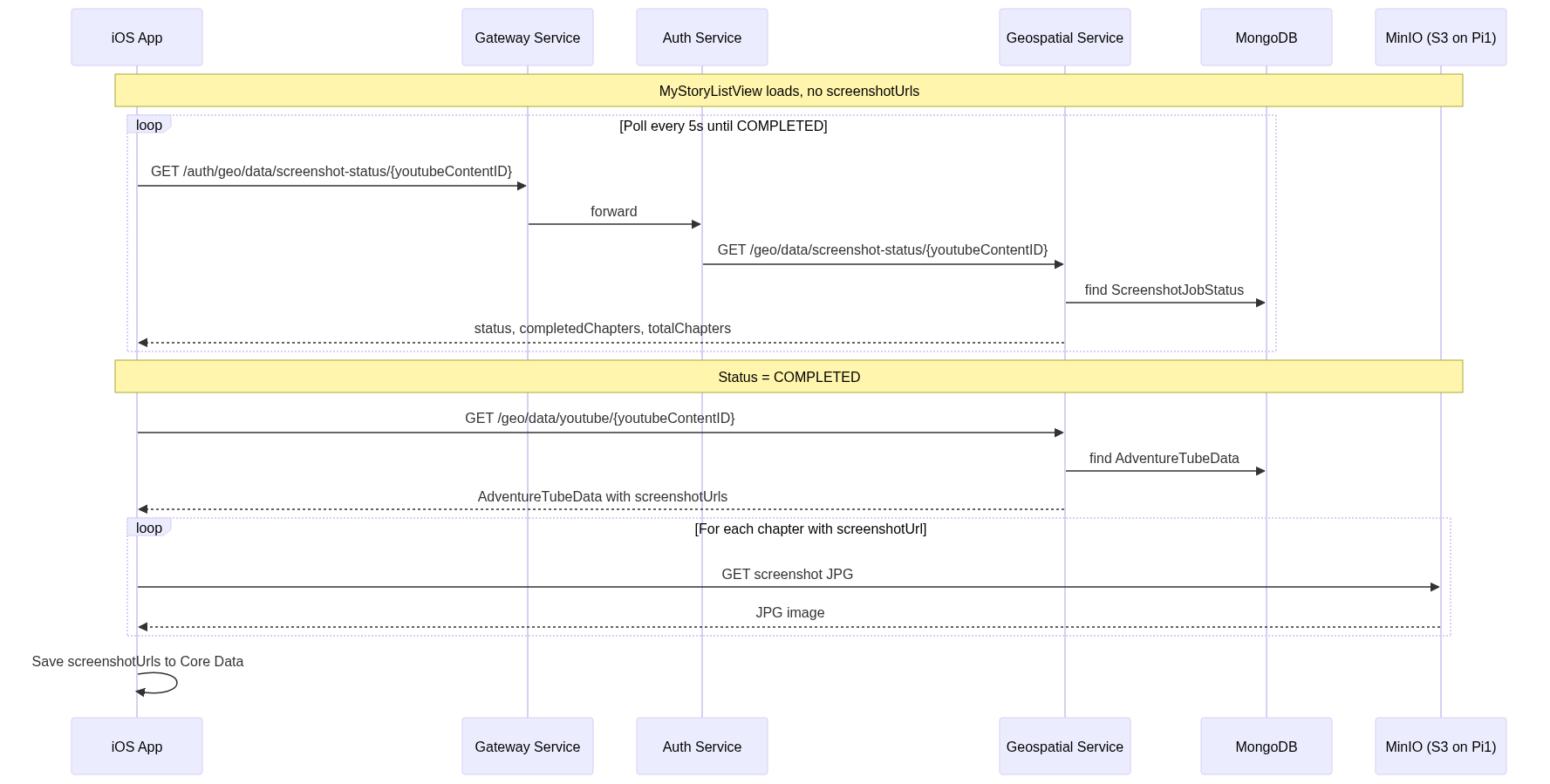
iOS Call Stack: Thumbnail Polling Flow (TODO)
MyStoryListView.onAppear                            // MyStoryListView.swift
│
├─ for each published story without screenshotUrls:
│  └─ storyViewModel.startScreenshotPolling(youtubeContentID:)
│
startScreenshotPolling()                            // StoryViewModel (new)
│
├─ screenshotStatus = .polling(0, total)
│
├─ Timer.publish(every: 5.0)
│  └─ pollScreenshotStatus(youtubeContentID:)
│     └─ GET /auth/geo/data/screenshot-status/{id}
│
└─ .sink receiveValue:
   ├─ .COMPLETED → fetchUpdatedData(youtubeContentID:)
   │              → save screenshotUrls to Core Data
   │              → cancel timer
   ├─ .FAILED    → screenshotStatus = .failed, cancel timer
   └─ .PROCESSING → keep polling

--- UI rendering ---

ChapterThumbnailRow(chapters:)                      // ChapterThumbnailRow.swift (new)
│
├─ ScrollView(.horizontal)
│  └─ LazyHStack
│     └─ ForEach(chapters) { chapter in
│        ├─ if screenshotUrl != nil:
│        │  └─ AsyncImage(url: minioBaseURL + screenshotUrl)
│        │     ├─ .placeholder { ProgressView() }
│        │     └─ .failure { placeholderImage }
│        └─ else:
│           └─ Rectangle().fill(.gray.opacity(0.2))
│        }
Java Call Stack: Screenshot Status Endpoint (TODO)
AdventureTubeDataController
│  GET /geo/data/screenshot-status/{youtubeContentID}
│
├─ screenshotJobStatusRepository
│     .findByYoutubeContentID(youtubeContentID)
│  └─ Optional<ScreenshotJobStatus>
│
├─ .map(jobStatus -> ResponseEntity.ok(
│     ServiceResponse.builder()
│        .success(true)
│        .data(jobStatus)
│        .build()
│  ))
│  .orElse(ResponseEntity.notFound().build())
│
└─ return response
API Specification
GET /geo/data/screenshot-status/{youtubeContentID}
| Response | Meaning | iOS Action |
|---|---|---|
{ "status": "PENDING" } |
Job created, not started | Keep polling |
{ "status": "PROCESSING", "completedChapters": 3, "totalChapters": 5 } |
In progress | Update progress UI, keep polling |
{ "status": "COMPLETED" } |
All screenshots ready | Fetch updated data, stop polling |
{ "status": "FAILED", "errorMessage": "..." } |
Generation failed | Show placeholder, stop polling |
404 |
No screenshot job | Show placeholder, don’t poll |
Screenshot URL Construction
Base URL: https://s3.travel-tube.com/chapter-screenshots/
Full URL: {baseURL}{chapter.screenshotUrl}
Example: https://s3.travel-tube.com/chapter-screenshots/WsghFCuoZ6Q/ch1_176s.jpg
TODO
Backend
- Add GET /geo/data/screenshot-status/{youtubeContentID} REST endpoint
- Add route in auth-service to proxy the endpoint
- Add route in gateway-service
iOS
- Add screenshotUrl property to Chapter Core Data model
- Create ChapterThumbnailRow SwiftUI view (horizontal scroll with AsyncImage)
- Add screenshot polling logic (Timer + API call)
- Integrate into MyStoryListView published story cards
- Cache screenshotUrl in Core Data after first successful fetch
Deployment
- Install yt-dlp + ffmpeg in geospatial-service Docker image for Pi
- Update Jenkins credentials with MinIO env vars
- Deploy to K3s and test on Pi